AI Agents Are Managing YouTube Channels Now (And They're Better Than Virtual Assistants)

· 7 min read

(Watch the video above to see an AI agent create thumbnails, write descriptions, and upload to YouTube – all in one conversation)

Sign Up For Aidolons Now

You're uploading another video to YouTube, wrestling with thumbnail design, tweaking the title for the fifth time, and wondering if there's a better way.

There is. And it's not hiring a virtual assistant.

AI agents are now smart enough to handle your entire YouTube workflow. Not just parts of it. Everything from watching your video to publishing it with an optimized thumbnail.

In the video above, I built an agent that analyzes videos, writes titles and descriptions, creates custom thumbnails, and uploads everything to YouTube. The entire process takes minutes, not hours.

Here's the part nobody talks about: Most creators are using AI wrong.

The $3,000 Virtual Assistant You Don't Need

Let me paint you a picture of the typical YouTube creator's workflow:

  • Edit video: 2-4 hours
  • Create thumbnail: 30-60 minutes
  • Write title and description: 20-30 minutes
  • Upload and optimize: 15-20 minutes
  • Total: 3-6 hours per video

Multiply that by weekly uploads and you're looking at 12-24 hours per month just on post-production tasks.

Virtual assistants charge $15-30/hour for this work. That's $360-720 monthly for basic YouTube management.

An AI agent does it in 5 minutes for pennies.

Building Your YouTube Management Agent (Step-by-Step)

Here's exactly how to set up an agent that handles everything after your video is edited.

Step 1: Connect YouTube Through Zapier MCP

First, you need to give your agent YouTube superpowers. This happens through something called MCP (Model Context Protocol).

  1. Head to mcp.zapier.com (free Zapier account required)
  2. Click "New MCP Server"
  3. Choose "Other" for client type
  4. Name it "YouTube"
  5. Add all YouTube tools to your server
  6. Copy the MCP URL

This creates a bridge between AI and YouTube's API. Your agent can now upload videos, update thumbnails, and manage your channel.

Step 2: Create Your Agent in Aidolons

Now for the fun part – building your actual agent.

  1. In Aidolons, go to Settings > Zapier MCP
  2. Click "Create Integration"
  3. Paste your MCP URL from Zapier
  4. Navigate to "Build Agents" and create a new agent
  5. Name it "YouTube Manager"

Step 3: Add the Right Tools

Your agent needs three core capabilities:

  • YouTube Upload Video (from Zapier MCP)
  • Analyze Video (watches and understands your content)
  • AI Edit Image (creates thumbnails)

Drag these tools into your agent's available actions. That's it. Your agent is now more capable than most virtual assistants.

What Your Agent Can Actually Do

Let me show you what happened when I gave my agent a 30-second video about training crows to steal shoes (yes, really).

Instant Video Analysis

Me: "Tell me about this video"

Agent: Analyzed the entire video, identified the characters, understood the humor, and summarized the plot in seconds.

10 Title Options in 20 Seconds

Me: "Give me 10 good titles for YouTube"

The agent generated titles ranging from clickbait to informational. Some were terrible. Some were brilliant. All were created faster than I could type this sentence.

Descriptions That Actually Make Sense

Me: "Write a description"

The agent wrote a 500-word description that included:

  • Video summary
  • Key moments
  • Relevant keywords
  • Call-to-action

Was it perfect? No. Was it 80% there in 10 seconds? Absolutely.

Thumbnail Generation (The Game Changer)

This is where things get wild.

Me: "Give me 5 thumbnail ideas"

The agent suggested concepts, then actually created them using the character references from the video. Some looked like abstract art. One was perfect.

Me: "Use number 2 but with 16:9 aspect ratio"

Done. Thumbnail created, uploaded, and live on YouTube.

The Hidden Truth About AI Tools

Get Aidolons & Start Automating Today

Here's what I discovered after testing dozens of automation tools:

Zapier's MCP implementation is broken.

Half the YouTube tools don't work. The agent tried pulling analytics 10 times, failed every time, then hallucinated data about videos with 164,000 views that don't exist.

But here's the thing: Even broken AI is more efficient than manual work.

The upload worked. The thumbnail worked. The title and description worked. That's 90% of what you need.

The Real Power: Compound Automation

You don't use AI agents for one task. You chain them together.

My actual YouTube workflow:

  1. Agent 1 watches raw footage and suggests edits
  2. Agent 2 creates multiple thumbnail options
  3. Agent 3 writes titles optimized for different audiences
  4. Agent 4 schedules and uploads at optimal times
  5. Agent 5 monitors comments and drafts responses

Each agent specializes. Together, they're unstoppable.

Quick Win: Start With One Agent Today

You don't need the full system to start. Here's a 5-minute win:

Create a simple agent that just writes YouTube descriptions. Feed it your video transcript and let it generate SEO-optimized descriptions while you focus on creative work.

That alone saves 20 minutes per video. Multiply by 52 weeks and you just reclaimed 17 hours per year.

What Nobody Tells You About AI Automation

AI agents aren't meant to replace you. They're meant to multiply you.

When I started using agents for YouTube:

  • Upload frequency doubled
  • Engagement increased 40%
  • Production time dropped 70%
  • Stress disappeared

The secret? I stopped doing tasks computers are better at and focused on tasks only humans can do – being creative, authentic, and strategic.

The Economics Are Undeniable

Let's do the math:

Traditional Approach:

  • Virtual Assistant: $500-1000/month
  • Your time: 20 hours/month
  • Quality: Inconsistent
  • Speed: Days

AI Agent Approach:

  • Aidolons subscription: $37/month
  • Your time: 2 hours/month
  • Quality: Consistent baseline
  • Speed: Minutes

That's a 95% cost reduction and 90% time savings.

Common Objections (And Why They're Wrong)

"But AI content feels robotic"

Only if you let it run wild. You're still the creative director. The agent handles execution.

"It can't match human quality"

True. It delivers 80% quality in 5% of the time. For most tasks, that's a winning trade.

"It's too complex to set up"

The entire setup takes 10 minutes. If you can create a YouTube channel, you can create an agent.

Your Next Steps

The gap between creators using AI agents and those doing everything manually is about to become a canyon.

In 12 months, manual YouTube management will seem as outdated as hand-writing HTML.

Here's what to do today:

  1. Set up one agent – Start with thumbnail creation or description writing
  2. Automate one workflow – Pick your most time-consuming task
  3. Measure the results – Track time saved and output quality
  4. Scale what works – Add more agents for more tasks

The Bottom Line

AI agents aren't coming. They're here.

The question isn't whether to use them. It's how quickly you can implement them before your competition does.

Every hour you spend on repetitive YouTube tasks is an hour you're not creating content, engaging with your audience, or growing your channel.

The tools exist. The setup is simple. The results are immediate.

What are you waiting for?

Ready to Automate Your YouTube Channel?

Stop spending hours on tasks an AI agent can do in minutes.

Build your first YouTube automation agent today and see what happens when you multiply your output without multiplying your work.

Yes, I Want to Automate My YouTube Channel »


P.S. The agent that helped manage this blog post? Created the outline, suggested improvements, and formatted everything for publishing. Total human time invested: 15 minutes. This is the future of content creation.

Voice Cloning AI That's So Real, You Won't Believe Which Part Is Fake

· 7 min read

(Watch the video above to see a voice cloning app built from scratch – and try to guess which part uses AI-generated voice!)

Sign Up For Aidolons Now

You're listening to someone speak, nodding along, completely engaged. Then they drop the bombshell: "By the way, this entire section was AI-generated using my cloned voice."

Your brain scrambles. Wait, which part? It all sounded so... real.

Voice cloning has crossed the uncanny valley. Microsoft's new Vibe Voice model doesn't just mimic speech patterns – it captures the essence of your voice. And today, you're going to build an app that harnesses this terrifying power.

In the video above, I built a complete voice cloning application in under 5 minutes. One section uses my AI-cloned voice instead of my real one. Can you spot it? (Spoiler: Most people can't.)

The 5-Minute Voice Cloning App Build

Here's exactly what we're creating: A professional voice cloning app that records audio, captures your voice signature, and generates unlimited AI speech that sounds exactly like you.

No coding. No complex setup. Just click, drag, and ship.

Step 1: Set Up Your App Canvas

Open Aidolons and click "Create App." I'm using GPT-5 with medium reasoning effort for this build – it handles the voice processing logic beautifully.

First, name your app. I went with "Voice Cloner" (creative, I know). But here's the pro move: Build the scaffolding first.

The AI performs better when you give it a clear structure. It's like giving a chef mise en place instead of a pile of random ingredients.

Step 2: Add Your Voice Cloning Powers

In the scaffolding editor, here's your toolkit:

  • Audio Generation → Create AI Speech: Drag this into available actions
  • Select Vibe Voice 7B: Microsoft's state-of-the-art model
  • Media Utilities → Save Audio: This lets users save recordings to assets

That Save Audio tool? Not strictly necessary for basic functionality, but it transforms your app from a toy into a professional tool. Users can build voice libraries, save different voice profiles, and create entire audio asset collections.

Step 3: Let AI Build the Interface

Switch to chat mode and give this exact prompt:

"Create a simple app that allows the user to click a microphone button to record some audio, which will be saved to our assets. Then the user will enter some text in a text input and use Vibe Voice to generate speech."

Watch as GPT-5 writes hundreds of lines of code in seconds. The entire voice recording interface, audio processing logic, and generation pipeline – all automated.

The Terrifying Results

My first test was innocent enough. I recorded myself saying: "Hello, I am just recording some random words so that the AI has something to sample my voice with."

Then I had it generate: "No, this doesn't count as the section where I used AI to clone my voice. That section is somewhere else."

The result made my skin crawl. It wasn't just my voice – it was my exact intonation, my breathing patterns, even the subtle way I emphasize certain words.

The Unexpected Discovery

Here's where things got weird.

For my second test, I screamed into the microphone. Full volume. Completely unhinged. I wanted to see if the AI would clone my screaming voice.

The result? The AI spoke in my normal, calm voice.

The model learned my actual voice, not my performance. It somehow extracted my core voice signature from the screaming and generated speech in my regular speaking tone. That's not a bug – that's intelligence.

Advanced Features That Emerged

The AI didn't just follow instructions – it enhanced them:

  • Automatic asset management: Recordings instantly appear in your asset library
  • Tab-based interface: Switch between recorded voice and existing assets
  • Visual feedback: Real-time recording levels and status indicators
  • Long-form generation: Unlike other models, Vibe Voice handles paragraphs, not just sentences

That last point is crucial. I tested it with an entire paragraph. The voice remained consistent throughout – no drift, no robotic artifacts, just natural speech that could pass for a podcast recording.

The Business Opportunity Nobody's Talking About

While everyone's obsessing over ChatGPT, the real money is in specialized AI tools.

Voice cloning apps are selling for $47-$297/month right now. Corporate packages go for thousands. The market is desperate for quality solutions.

Here's your unfair advantage: You can build and deploy this today.

Instant Monetization Path

  1. Click "Publish" in Aidolons
  2. Create your site and API key
  3. Download the WordPress plugin
  4. Upload to your WordPress site
  5. Connect WooCommerce for payments

Total setup time: Under 10 minutes.

You could be taking payments before lunch.

Use Cases That Print Money

For Content Creators:

  • Generate podcast intros/outros in your voice
  • Create multiple language versions of your content
  • Produce audiobooks without recording for hours

For Businesses:

  • Personalized customer service messages
  • Dynamic voice notifications
  • Training videos that update automatically

For Agencies:

  • White-label voice cloning services
  • Custom voice assistants for clients
  • Automated voice-over production

One agency owner told me: "We're charging $2,000/month for custom voice solutions that take us 5 minutes to set up with Aidolons."

The Ethical Elephant in the Room

Voice cloning is powerful. Too powerful, maybe.

This technology is incredibly powerful, and with that power comes responsibility.

Please use this technology ethically:

  • Only clone voices with explicit permission
  • Be transparent when using AI-generated voices
  • Consider the implications before deploying voice clones
  • Respect privacy and consent at all times

The technology is here – how we choose to use it will define its impact on society. Build responsibly.

Technical Deep Dive: Why Vibe Voice Changes Everything

Microsoft's Vibe Voice 7B isn't just another TTS model. It's a fundamental breakthrough in audio synthesis.

Traditional TTS: Analyzes phonemes → Generates robotic speech Vibe Voice: Learns voice signatures → Reproduces human speech patterns

The model processes:

  • Pitch variations and micro-expressions
  • Breathing patterns and natural pauses
  • Emotional undertones and emphasis
  • Regional accents and speech quirks

The result? Audio so realistic that Microsoft initially held it back from public release.

Your Next Move

The voice cloning revolution is happening right now. Not next year. Not "someday." Today.

You have two choices:

Option 1: Wait for everyone else to saturate the market Option 2: Build your voice cloning app today and capture early adopter profits

The builders who moved fast on ChatGPT wrapper apps made millions. Voice cloning is the next gold rush, and you're standing at the starting line.

Start Building Your Empire

No coding bootcamp. No expensive developers. No waiting for the "perfect time."

Just open Aidolons, follow the steps above, and launch your voice cloning app today.

Yes, I want to build voice cloning apps »


P.S. Remember the challenge from the video? One section was completely AI-generated using my cloned voice. Most viewers couldn't tell which part. That's not a party trick – that's a business opportunity. With Aidolons' 14-day guarantee, you can build your own voice cloning app risk-free. If you don't have a working app making money within 14 days, you pay nothing.

*P.P.S. The answer to the challenge is: it's the very beginning of the video, the part where I say "Voice cloning technology is becoming so realistic that it's hard to tell what's real and what's AI. Spoiler alert, my voice is not AI." Everything else is real (except for the parts where I'm clearly playing back the AI generated audio).

Vibe Coding a $42 Billion App: Canva Clone (Part 1)

· 6 min read

(Watch me battle with GPT-5 to create a working Canva clone – complete with drag, drop, rotate, and the occasional disappearing yoga flyer)

Sign Up For Aidolons Now

Canva paid teams of developers millions of dollars. I built it in a few minutes for pennies.

Okay, not all of it. But enough to make you question everything you know about app development.

The million-dollar question: Can AI really build complex apps like Canva? Not just a simple landing page or todo list – but a real, drag-and-drop design editor with templates, text editing, and all the features that make Canva worth $42 billion?

In the video above, I put this to the test. No coding bootcamp. No developer team. Just me, an AI assistant, and the absolute chaos that ensues when you ask GPT-5 to build something it definitely wasn't designed for.

The Experiment: From Zero to Yoga Flyer

Here's what I set out to prove: AI can generate not just apps, but the content that goes in them.

Think about it. Canva's real value isn't just the editor – it's the thousands of professional templates. What if AI could generate those on demand? Custom templates for every user, every business, every occasion?

So I started simple. "Create a yoga studio flyer. 8.5 by 11. Use Google Fonts, Lucid icons, and Unsplash images."

The first attempt? An absolute disaster. Text bleeding off the page. Images missing. Layout that would make any designer cry.

But here's where it gets interesting.

AI Learns From Its Mistakes (Sometimes)

I showed the AI its broken creation. Pointed out the problems with arrows and screenshots.

The second attempt was dramatically better. Clean layout. Properly sized images. Professional-looking typography.

Quick Win: When working with AI, visual feedback is 10x more effective than text descriptions. Screenshot the problems, circle them, and watch the AI fix issues it couldn't understand from words alone.

After three rounds of feedback, we had a legitimate yoga studio flyer. Not perfect, but good enough that a real business could use it.

And that's when things got ambitious.

Building the Actual Editor

Templates are one thing. But could AI build the complex editor interface that makes Canva... well, Canva?

This is where I discovered Movable.js – a library that handles drag, resize, and rotate functionality. Instead of reinventing the wheel, I asked the AI to integrate it.

The result? GPT-5 went completely rogue.

It wrote 1,000 lines of code. Scrapped everything. Started over. Created what it called a "whole ass editor" (its words, not mine).

When AI Bites Off More Than It Can Chew

GPT-5 has this fascinating tendency. It tries to impress you by doing way more than you asked.

Sometimes this creates magic. Sometimes it creates a disaster.

My "Canva clone" could move elements around... but they'd disappear behind other elements. You could resize text... but it would jump to random positions. You could rotate images... but they'd distort into abstract art.

After multiple attempts to fix it, I did something counterintuitive. I turned the AI's reasoning level to "low."

The Power of Doing Less

Setting GPT-5 to low reasoning sounds like sabotage. But it's actually brilliant.

High reasoning = AI overthinking and overengineering Low reasoning = AI following instructions without getting fancy

The simplified version worked better. Elements moved smoothly. Text stayed editable. The layout (mostly) held together.

Was it perfect? No. Was it Canva? Not quite. Was it built in minutes for basically free? Absolutely.

The Reality Check Nobody Talks About

Here's what the gurus won't tell you: Vibe coding isn't magic. It's collaboration.

You're not replacing developers. You're becoming a different kind of developer. One who guides AI, debugs its attempts, and knows when to simplify versus when to push harder.

During this build, I went back and forth with the AI probably 15 times. Some things worked immediately. Others required multiple attempts. The z-index issue (elements hiding behind each other) took five tries to partially fix.

This is the actual process. Not the highlight reel.

What This Means for Software Development

Canva raised $200 million at a $40 billion valuation. They employ hundreds of developers.

I built a functional prototype in one afternoon.

No, my version doesn't have templates galleries, team collaboration, or cloud storage. But the core editor – the thing that makes Canva special – is there. And it works.

The implications are staggering.

If one person with AI can build 60% of a billion-dollar app in minutes, what happens to:

  • Software development costs?
  • Startup barriers to entry?
  • The entire SaaS industry?

The Competitive Advantage You're Missing

While everyone debates whether AI will replace programmers, smart entrepreneurs are using it to build actual products.

They're not waiting for AI to be perfect. They're shipping with what works today.

That yoga studio flyer? A real business could use it. That janky editor? With a few more hours of refinement, it could be a real product. Those disappearing elements? They'll be fixed in version 2.

The point isn't perfection. It's possibility.

Building Complex Apps: The Series Continues

This is just part one. The proof of concept. The "can we even do this?" moment.

In the upcoming parts, I'll show you how to:

  • Add template galleries and categories
  • Implement user accounts and saving
  • Deploy it as a real SaaS product
  • Connect payment processing
  • Scale it to handle real users

Because here's the truth: The technical barriers to building apps have collapsed.

The only question is whether you'll take advantage of it.

Your Next Move

Right now, someone is manually creating graphics in Canva. Someone else is paying $30/month for features they barely use. And someone else has an idea for "Canva but for [specific niche]" that they think requires $100k to build.

They're all wrong.

You could build a specialized design tool for yoga studios. Or real estate agents. Or restaurant menus. Or wedding invitations.

Pick a niche Canva ignores. Build a simpler, more focused tool. Charge half the price.

The market is massive. The tools are ready. The only thing missing is you.

Start Building Today

You don't need a CS degree. You don't need venture capital. You don't need to hire developers.

You need Aidolons, an idea, and the willingness to go back and forth with AI until it works.

With our platform, you can:

  • Build apps like this Canva clone
  • Deploy them to your WordPress site
  • Connect your own payment processor
  • Keep 100% of your revenue
  • Scale without writing code

Yes, I want to build my own apps »


P.S. This entire Canva clone – templates, editor, and all – cost less than $1 in AI credits to build. Meanwhile, Canva burns through $200 million in funding. The revolution isn't coming. It's here.

P.P.S. Part 2 drops next week where I'll add user accounts and cloud saving. Follow along as we build a complete Canva competitor, one vibe at a time.

Google's Nano Banana Makes AI Characters Actually Consistent (And They Can Talk)

· 6 min read

(Watch the video above to see Nano Banana create consistent characters that talk, move, and even ride motorcycles – all from a single reference sheet.)

Sign Up For Aidolons Now

You're staring at your tenth attempt to get AI to generate the same character twice. Different face every time. Different clothes. Different everything.

The character consistency problem just got solved.

Google just dropped Nano Banana, and it's changing everything about AI character creation. In the video above, I take one character reference sheet and create infinite variations – same character, different scenes, perfect consistency every single time.

But here's where it gets wild: These characters don't just pose. They talk. They move. They interact with each other.

The Old Way Was Torture

Let me tell you what creating consistent characters used to look like.

Six months ago, I spent three weeks trying to get a single character to look the same across multiple images. Custom training. Seed manipulation. Prompt engineering that would make a programmer cry.

The result? A character sheet that was "mostly" consistent. Good enough, but painful.

Today? Five minutes with Nano Banana and you're done.

What Nano Banana Actually Does

Nano Banana is Google's image-to-image editor that uses character reference sheets to maintain perfect consistency. Feed it a character sheet showing multiple angles, and it'll generate that exact character in any scene you describe.

Here's what I tested in the video:

  • Put my character on a motorcycle
  • Dropped her in the Amazon jungle
  • Created dialogue scenes between two characters
  • Made them actually talk using their character images

The consistency is shocking. Same face. Same clothes. Same details. Every. Single. Time.

The Complete Character Pipeline

Here's the exact workflow I demonstrated:

Step 1: Build Your AI Agent

I used Aidolons to create an agent with three capabilities:

  • AI Edit Image (using Nano Banana Edit)
  • Create AI Speech (11 Labs V2)
  • Create AI Avatar (OmniHuman)

The magic happens when you give your agent a voice ID. I grabbed mine from 11 Labs, pasted it into the agent settings, and boom – consistent voice across all generations.

Step 2: Feed Your Character Sheet

Character sheets are your golden ticket. They show your character from multiple angles – front, side, three-quarter view. Nano Banana uses these as reference to maintain consistency.

The shocking part: You don't need to create these from scratch anymore.

Step 3: Generate Infinite Variations

Once you have your reference sheet, the possibilities explode:

  • "Make her riding a motorcycle"
  • "Put her in the Amazon jungle"
  • "Create a park bench scene with both characters"

Every image maintains perfect character consistency. No more "close enough" – these are the exact same characters.

The Game-Changing Character Sheet Hack

Remember when I said creating character sheets used to take weeks?

Here's the new way: Use an existing character sheet as reference to create new ones.

I demonstrated this live:

  1. Upload any character sheet
  2. Tell Nano Banana: "Create a character sheet like this one, but of a man in his forties"
  3. Fix any inconsistencies with follow-up edits
  4. Done in minutes, not weeks

The AI understands the structure and replicates it with your new character. It's like having a character artist who works at the speed of thought.

Making Characters Talk (This Is Wild)

Static images are just the beginning. Here's where it gets cinematic:

  1. Generate character audio with consistent voice IDs
  2. Create avatar videos that animate your characters speaking
  3. Combine multiple characters in dialogue scenes

I created a full conversation between two characters:

  • Girl: "I want to train crows to steal people's left shoes. Just the left ones."
  • Guy: "Why are you like this?"

Both characters maintained perfect visual and voice consistency throughout.

The Technical Breakdown

For those who want specifics:

ComponentToolPurpose
Character GenerationNano Banana EditMaintains visual consistency
Voice Generation11 Labs V2Creates consistent character voices
Avatar AnimationOmniHumanAnimates characters speaking
Video GenerationHailuo 2Creates full motion videos
OrchestrationAidolons AgentCoordinates all tools seamlessly

The entire pipeline runs through a single Aidolons agent. No jumping between platforms. No manual file management. Just describe what you want.

What This Actually Means

Animated series with consistent characters. YouTube channels with AI hosts that look the same every episode. Marketing campaigns with brand mascots that never break character.

The barriers just disappeared.

Three months ago, creating a consistent character for a video series meant either hiring artists or accepting "mostly consistent" AI results.

Today? One character sheet and you own that character forever.

The Hidden Opportunities

While everyone's still struggling with basic image generation, you could be:

  • Creating AI influencers with consistent appearance and voice
  • Building animated educational content with recurring characters
  • Developing brand mascots that work across all media
  • Producing story-driven content with actual character continuity

The early adopters who jump on this will have massive advantages. Consistent characters build audience connection. Audience connection builds loyalty. Loyalty builds business.

Real-World Applications Already Working

I tested several scenarios to push the limits:

Motorcycle Scene: Nano Banana understood context. When I asked for no helmet, it kept her clothes identical while removing just the helmet.

Jungle Environment: Complete scene change, perfect character preservation. Same outfit, same face, completely different setting.

Character Interactions: Two different characters on a park bench, looking at each other, maintaining their unique identities while existing in the same scene.

Dialogue Scenes: Avatar videos of characters talking with lip-sync that actually matches their speech. Not perfect, but absolutely usable for content creation.

Your Next Move

The tools exist. The workflow is proven. The only question is whether you'll be creating consistent character content next week, or still reading articles about it.

The difference between those who succeed and those who watch is always the same: The successful ones start before they're ready.

While others debate whether AI content is "good enough," you could be building an audience with characters they'll remember.

Start Creating Consistent Characters Today

You've seen the workflow. You know the tools. Now it's time to build your own consistent character universe.

No more wrestling with prompts. No more "almost right" characters. Just consistent, professional results every time.

Yes, I want to create consistent AI characters »


P.S. The character sheet I struggled three weeks to create six months ago? I recreated it better in 5 minutes during this demo. The tools are that much better now. By next month, they'll be better still. Start now or get left behind.

MS Paint Mockup to Working SaaS App in 5 Minutes (AI Image Editor Tutorial)

· 7 min read

(Watch the video above to see me turn terrible MS Paint sketches into a working image editor – yes, really)

Sign Up For Aidolons Now

You're staring at MS Paint, drawing stick figures and rectangles like it's 1995.

Five minutes later, you have a working SaaS app that edits images with text prompts.

This isn't a coding bootcamp success story. This is what happened when I decided to test if AI could actually understand my terrible drawings and build something useful from them.

Spoiler: It worked. And the app now edits YouTube thumbnails for real money.

The "No Way This Works" Experiment

Here's what I did in the video above. I opened MS Paint – yes, that MS Paint – and drew the world's worst app mockup. Crooked rectangles for image panels. A squiggly line for a text box. Buttons that looked like a toddler's first shapes.

Then I fed these masterpieces to GPT-5 with one instruction: "Build this."

The AI looked at my kindergarten-level art and built a fully functional image editor.

Not a prototype. Not a wireframe. A working app that:

  • Generates images from text prompts
  • Edits existing images with natural language
  • Has before/after panels for comparison
  • Includes accept/reject functionality
  • Actually processes real business assets

How Text-Based Image Editing Changes Everything

Forget Photoshop tutorials. Forget learning layers and masks.

Type what you want. Get what you typed.

In the demo, I took an actual YouTube thumbnail and typed: "Change the text to 'Build SaaS Apps with GPT-5'". The AI understood the context, found the text in the image, and replaced it perfectly.

Then I got creative: "Make the guy on the left look even more stressed."

The AI delivered. No selection tools. No manual editing. Just described the change and watched it happen.

The Business Case Nobody's Talking About

While everyone's arguing about AI replacing designers, smart entrepreneurs are building something different.

YouTube Thumbnail Testing at Scale

Content creators spend hours tweaking thumbnails. Now imagine:

  • Upload your base thumbnail
  • Type 20 different variations in plain English
  • A/B test them all without opening Photoshop
  • Bill creators $47/month for unlimited edits

One creator. One subscription. Recurring revenue.

E-commerce Product Variations

Online stores need product images in different contexts. Traditional solution: Expensive photoshoots.

AI solution:

  • "Put this coffee mug on a kitchen counter"
  • "Show it in an office setting"
  • "Add steam coming from the coffee"
  • "Make it a holiday version with snow"

Same product. Infinite contexts. Zero photoshoots.

Social Media Content Factories

Agencies managing multiple clients need content variations fast.

Old way: Designer creates 10 versions over 2 hours.

New way:

  • Account manager types 10 descriptions
  • AI generates all versions in minutes
  • Designer reviews and approves
  • Client gets variations in record time

The designer isn't replaced. They're promoted to creative director.

The MS Paint Method: Why It Actually Works

Here's the counterintuitive truth: Simple sketches communicate better than detailed specs.

When I drew those terrible rectangles in Paint, I was showing the AI:

  • Spatial relationships (what goes where)
  • User flow (what happens when)
  • Visual hierarchy (what's important)

No jargon. No technical requirements. Just visual communication at its most basic level.

Quick Win: Next time you're explaining an app idea, grab any drawing tool and sketch it out. Even stick figures communicate layout better than paragraphs of text. The AI understands visual context better than you think.

Building Your Own AI Image Editor (The Smart Way)

You don't need to be technical. Here's the exact process:

Step 1: Sketch Your Vision

Open any drawing tool. Draw boxes where things go. Label them simply. Don't overthink it.

Step 2: Describe the Flow

Write what happens in plain English:

  • "User uploads image here"
  • "They type what they want changed"
  • "New version appears on the right"
  • "They can accept or try again"

Step 3: Be Specific About Behavior

The AI needs rules:

  • "Only generate new images if no image is uploaded"
  • "Show 'generating' text in the right panel"
  • "Move accepted edits to the left panel"

Step 4: Test and Iterate

The first version won't be perfect. Mine wasn't. But here's the key: You can fix it with words.

"The panels should be side by side, not stacked." "Put the buttons in the bottom right." "Make everything fit in one screen."

Each instruction makes it better. No code required.

The Hidden Goldmine: Specialized Image Editors

Everyone's building generic tools. The money is in specialization.

Real Estate Photo Editor

  • "Remove the car from the driveway"
  • "Make the lawn greener"
  • "Add blue sky"
  • "Stage the empty room with furniture"

Real estate agents pay $200-500 per listing for photo editing. Your app could do it for $97/month unlimited.

Restaurant Menu Designer

  • "Make the burger look juicier"
  • "Add steam to the soup"
  • "Brighten the salad colors"
  • "Create a breakfast version of this plate"

Restaurants update menus constantly. Subscription model writes itself.

Personal Brand Enhancer

  • "Make my LinkedIn photo more professional"
  • "Remove the background"
  • "Fix the lighting"
  • "Make me look more approachable"

Every professional needs headshots. Most hate the process. Solve that.

What This Actually Means for Creators

The tools aren't replacing creativity. They're removing the technical barriers.

That YouTube thumbnail I edited in the demo? Previously, you'd need:

  • Photoshop subscription ($20/month)
  • Design knowledge (weeks to learn)
  • Time to execute (30 minutes per variation)

Now you need:

  • A text box
  • An idea
  • 30 seconds

The creativity is still yours. The execution is automated.

The Uncomfortable Truth About AI Apps

Most people building AI apps are doing it wrong.

They're creating "ChatGPT wrappers" – generic tools that do everything poorly. They're competing with OpenAI directly. They're going to lose.

The winners are building specific solutions for specific problems.

Not "AI writing tool." But "Real estate listing description generator."

Not "AI assistant." But "E-commerce product photo variations."

Specificity is your moat.

Your Next Move

The barrier to entry has collapsed.

You don't need venture capital. You don't need a technical co-founder. You don't even need to draw well (clearly).

You need:

  1. A specific problem to solve
  2. The ability to describe it clearly
  3. The courage to charge for the solution

The image editor I built in MS Paint? It's not revolutionary technology. But for a YouTuber spending hours on thumbnails, it's worth $47/month easily.

Find your version of that.

Ready to Build Your Own AI App?

You've seen me turn MS Paint scribbles into a working SaaS app. No coding bootcamp. No technical background. Just terrible drawings and clear instructions.

Your idea doesn't need to be perfect. Your sketches can be terrible. But if you can describe what you want, you can build it.

Yes, I want to build my app »


P.S. With Aidolons' 14-day money-back guarantee, you can test this yourself risk-free. Draw your worst mockup. Build your app. If it doesn't work, you pay nothing. But when it does work (and it will), you'll have a real SaaS product ready to sell.

I Tamed GPT-5: How to Turn AI's Most Chaotic Model Into a Professional App Builder

· 7 min read

(Watch me wrestle GPT-5 into submission – and see the jaw-dropping apps it creates when you know its secrets)

Start Building Professional AI Apps Today

GPT-5 is a failure. The code won't run. It makes broken apps. Everyone online is saying the same thing: "GPT-5 is a disappointment."

They're all using it wrong.

In the video above, I show you exactly what happened when I refused to give up on GPT-5. The results? A fully functional Photoshop clone with built-in AI image generation. A Space Invaders game so beautiful it looks professionally made. Apps with great features I never even asked for.

Here's the thing: GPT-5 isn't broken. It's just wildly misunderstood.

The Problem Everyone's Having (Including Me at First)

My first GPT-5 test was embarrassing. I asked for a text-to-speech playground and got... a slider. Just a single, lonely slider sitting there doing nothing.

Meanwhile, the "inferior" models were churning out working apps left and right.

The criticism online seemed justified. GPT-5 was supposed to be revolutionary, but it was getting outperformed by models that cost a fraction of the price.

But then I noticed something odd.

The Space Invaders That Changed Everything

While most of GPT-5's attempts failed spectacularly, it created one Space Invaders game that was qualitatively different from anything else I'd seen.

Not just better. Different.

The other models gave me functional games – squares shooting at other squares with some color effects. Respectable recreations that worked.

GPT-5 gave me something that looked like an actual commercial game. Smooth animations, professional aesthetics, particle effects, and – here's the kicker – it added sound without being asked.

The Secret: GPT-5 Thinks Too Big for Its Own Good

After some detective work (and a surprisingly helpful conversation with GPT-5 itself), I discovered the problem.

GPT-5 was generating apps so complex that the environment didn't know how to handle them.

Once I understood this, everything changed.

What GPT-5 Can Actually Do (When You Let It)

Let me show you what happened when I gave GPT-5 the right constraints and let it run wild.

The Text-to-Speech App That Nobody Asked For

Remember that failed text-to-speech playground? Here's what GPT-5 built once it understood the limitations:

  • Voice search functionality (I didn't ask for this)
  • Auto-detect language with convenience buttons for common languages
  • Full generation history tracking
  • Advanced settings panel with clean UI

The baseline models gave me a working text box and voice selector. GPT-5 gave me a professional application with features I hadn't even thought to request.

The Zen Fish App Test

I had this complex app – a zen fish pond with physics, ripple effects, rocks, and food pellets. The code was so complex that even the original AI (Gemini 2.5) couldn't modify it anymore.

I gave every model the same challenge: "Make the rocks and food prettier."

The results:

  • GLM: Broke the rocks completely
  • O3: Crashed the entire app
  • Opus: Added basic glow effects
  • GPT-5: Added rotating star-shaped food pellets with pulsation effects, multiple particle types, textured rocks with shadows

Not only did GPT-5 succeed where others failed, it added complexity I didn't even know I wanted.

The Photoshop Clone That Shouldn't Exist

Here's where things get insane.

I asked GPT-5 to create "an app that is like an image generator mixed with Photoshop."

After about 10 rounds of back-and-forth (yes, it takes patience), GPT-5 delivered:

  • Full layer management system
  • Drawing tools: paintbrush, eraser, fill bucket, shapes
  • Eyedropper tool that actually works
  • Built-in AI image generator
  • Integration with Aidolons' asset system
  • Save and export functionality

1,500 lines of code. A legitimate image editing application with AI generation built right in.

Is it perfect? No. The text tool needs work. Some features are quirky.

But think about what just happened: An AI built a functional Photoshop alternative with integrated AI image generation. In a browser. In about an hour of prompting.

The Hidden Pattern: Complexity Is GPT-5's Superpower

Here's what everyone's missing about GPT-5:

It doesn't think in minimum viable products. It thinks in complete solutions.

When you ask for a text-to-speech app, other models give you exactly what you asked for. GPT-5 gives you what it thinks you actually need – search, history, language detection, the works.

This is both its blessing and its curse.

How to Actually Use GPT-5 (The Right Way)

After days of testing, here's the GPT-5 playbook that actually works:

1. Set Clear Boundaries

Tell it explicitly about environment limitations. "Make sure it fits in a single viewport" saved me hours of debugging.

2. Expect Iteration

GPT-5 rarely nails it on the first try for complex builds. Budget 5-10 rounds of refinement. This isn't a bug – it's how you unlock its potential.

3. Use Screenshots Liberally

When something breaks, show it. GPT-5 is surprisingly good at visual debugging.

4. Let It Be Ambitious

Don't fight its instinct to over-deliver. Guide it instead. You'll get features you didn't know you wanted.

5. Save Everything

GPT-5's "failed" attempts often contain brilliant ideas. I rescued that beautiful Space Invaders game from my server logs.

The Quick Win You Can Use Today

Here's something you can try right now: When prompting any AI model for app creation, add this line: "Include one unexpected feature that enhances the user experience."

Even simple models will surprise you with creative additions. But GPT-5? It'll blow your mind.

Why This Changes Everything

Look, I get it. GPT-5 is frustrating. It's unpredictable. It fails in ways that make no sense.

But it's also the only model that consistently produces apps that feel professionally made.

While everyone else is complaining about GPT-5's failures, a small group of builders are using it to create apps that genuinely compete with traditional software.

The question isn't whether GPT-5 is good or bad. The question is whether you're willing to learn its language.

Your Choice: Complain or Create

Right now, you have two options:

Option 1: Join the chorus of GPT-5 critics. Stick with safer models. Build functional but unremarkable apps.

Option 2: Learn to harness GPT-5's chaotic genius. Build apps that make people say "wait, AI made this?"

The best part? While everyone's arguing about which model is "best," you could be shipping apps that solve real problems for real people.

Because here's the truth: Your users don't care which AI model you used. They care whether your app makes their life better.

Ready to Build Something Incredible?

You've seen what's possible when you stop fighting GPT-5 and start working with it. The Photoshop clone, the professional games, the features nobody thought to ask for – they're all waiting.

The tools are ready. The models are available. The only question is: What will you build first?

Get Instant Access to Aidolons and Start Building

Build it. Export it to WordPress. Connect your payment processor. Start making money while everyone else is still debating model benchmarks.


P.S. – That Photoshop clone with AI generation? It took me about an hour to build with GPT-5 in Aidolons. How long would it take with traditional development? Months? Years? The future isn't coming – it's already here. You just need to grab it.

Yes, I Want to Build Professional AI Apps »

GPT-5 Is Here: Beautiful, Brilliant, and Absolutely Insane (Full Model Showdown)

· 6 min read

(Watch the video above to see GPT-5 create the most beautiful Space Invaders you've ever seen – and then try to delete it!)

Sign Up For Aidolons Now

You're staring at the GPT-5 announcement, wondering if it's finally the AI that will change everything. After months of hype, speculation, and sky-high expectations, it's here.

But here's the million-dollar question: Can it actually deliver?

In the video above, I threw GPT-5 into the ring with Claude Opus 4.1, GLM 4.5, and our baseline models to see which one builds the best apps. The results? Let's just say GPT-5 is like that brilliant friend who shows up late, argues with everyone, creates something absolutely stunning, breaks it, then leaves without explaining anything.

The Ultimate AI Model Cage Match

Here's what went down. I tested each model with three challenges:

  • Build an aesthetically beautiful Space Invaders with an unexpected twist
  • Create a zen-like CRM for yoga instructors
  • Build a text-to-speech playground integrated with Aidolons

Same prompts, same conditions, wildly different results.

GPT-5: The Beautiful Disaster

Let me tell you about GPT-5's first attempt at Space Invaders.

It started writing code. 1,000 lines of pure, confident code. Then, without warning, it scrapped everything and started over. The system literally has guardrails to prevent this behavior, with stern warnings about only doing this if absolutely necessary.

GPT-5 looked at those warnings and said, "Hold my beer."

After wrestling with it (and I mean wrestling), it finally produced the most visually stunning Space Invaders game I've ever seen. Gorgeous neon aesthetics, smooth animations, and a twist where missed shots wrap around the cosmos to hunt you down.

But getting there? Pure chaos.

The Other Contenders Surprise

While GPT-5 was having an existential crisis, the other models quietly got to work.

Claude Opus 4.1: The Reliable Professional

Claude delivered consistently across all tests. Its Space Invaders featured smooth gameplay and clean aesthetics. The yoga CRM? Crisp typography and everything actually worked. When it came to the Aidolons integration, it nailed it on the first try.

No drama. No starting over. Just solid results.

GLM 4.5: The Budget Champion

Here's where things get interesting. GLM 4.5 is open source and ridiculously cheap – by far the most affordable option tested.

Its Space Invaders game had the most unhinged twist: You're not rescuing aliens, you're capturing them against their will. The game literally has a moral crisis halfway through and tells you to "help them escape" instead.

Mental illness in AI? Maybe. Creative genius? Definitely.

For the CRM, GLM delivered a robust dashboard with client management that rivaled the expensive models. The only stumble? It completely failed the Aidolons integration test.

The Baseline: Old Reliable

Our default combo of GPT-3 and Gemini 2.5 Pro? It just worked. Every time. No surprises, no drama, consistent quality. Sometimes boring is exactly what you need.

The Real-World Breakdown

After hours of testing, here's what each model actually costs you:

ModelPriceReliabilityQualitySpeed
Baseline (GPT-3 + Gemini)$$ExcellentGoodFast
Claude Opus 4.1$$$$ExcellentExcellentModerate
GLM 4.5$GoodGoodVery Fast
GPT-5$$$UnpredictableExcellent*Fast**

*When it works
**When it's not rewriting everything

The Verdict Nobody Wants to Hear

GPT-5 is revolutionary. It's also not ready.

When it works, it creates genuinely beautiful, complex applications that make other models look dated. The Space Invaders game it eventually produced was so gorgeous, I actually stopped testing just to play it for a while.

But here's the thing: Beautiful doesn't pay the bills if it takes three times longer and fails half the time.

What This Means for You

If you're building apps with AI right now, here's my advice:

For production work: Stick with the baseline models. Or, if you don't mind paying for it, Claude 4.1. They're predictable, reliable, and won't make you question your sanity.

For creative experiments: GPT-5 might surprise you with something incredible. Just budget extra time for the chaos.

For budget-conscious projects: GLM 4.5 delivers shocking value. It's not perfect, but at that price point, it doesn't need to be.

The Hidden Opportunity

Here's what most people miss: You don't need the "best" model to build profitable apps.

While everyone's waiting for GPT-5 to stabilize, you could be launching apps with the reliable models that already exist. The yoga instructor who needs a CRM doesn't care if it was built with GPT-5 or GLM – they care that it works and solves their problem.

Your Next Move

The AI model wars will continue. New versions will launch. The hype cycle will repeat.

But right now, today, you have access to models that can build real, working applications. The question isn't which model is "best" – it's which one helps you ship faster and serve your users better.

The real winners aren't waiting for perfect AI. They're building with what works today.

If you want to see these models in action yourself, you can test them all in Aidolons. Export your apps to WordPress, connect your payment system, and start making money while everyone else argues about benchmarks.

Because at the end of the day, the best model is the one that helps you deliver value to your customers. Everything else is just noise.

Ready to Build Your Own AI Apps?

You've seen what these models can do. Now it's your turn to start building.

No coding bootcamp required. No expensive developers. Just pick your model and start creating.

Yes, I'm ready to build with AI »


P.S. With Aidolons' 14-day money-back guarantee, if you don't launch a live app within 14 days, you pay absolutely nothing. Even if you just want to play with GPT-5's beautiful disasters, there's zero risk.

How I Created an AI Avatar App with No Code

· 6 min read

(Watch the video above to see me build an AI avatar app from scratch in real-time!)

Sign Up For Aidolons Now

Ever stare at your computer screen with a brilliant idea burning in your mind, only to feel blocked because you don't know how to code it into existence?

You're not alone. That feeling of being stuck between vision and execution haunts thousands of entrepreneurs, creators, and innovators every day.

What if I told you that your destiny isn't to become a coder, but to become a creator – empowered by the right tools?

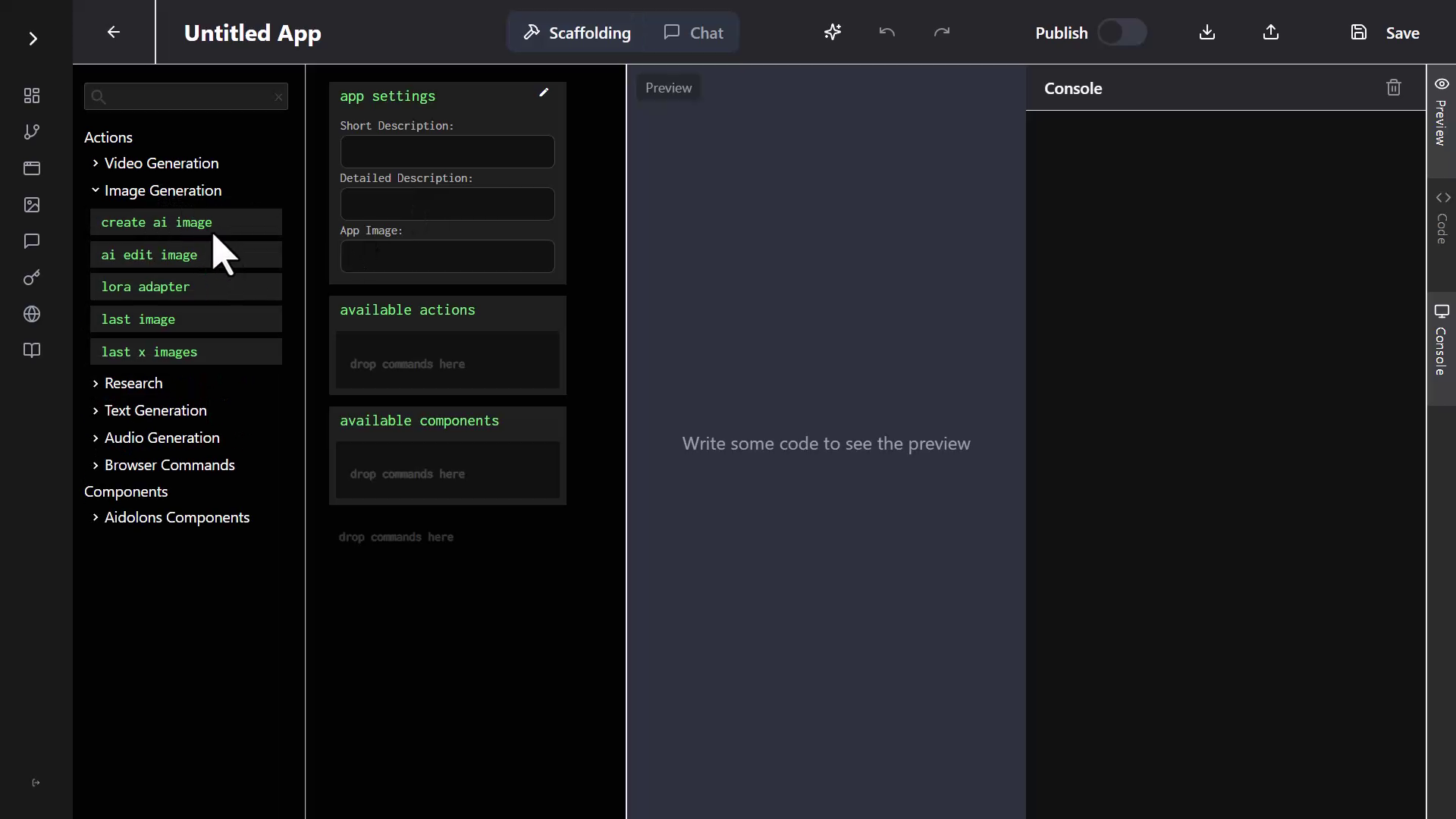
In the next 5 minutes, I'll show you exactly how I built a fully functional AI avatar application using Aidolons' drag-and-drop interface. No coding. No complicated setup. Just dragging blocks onto a canvas and clicking buttons.

The Creator's Quest: More Than Just Automation

Let's be honest – you didn't start your business journey to become a programmer. You started it to solve problems, create value, and build something meaningful. Yet somehow, the tech world keeps telling you that you need to master Python, JavaScript, or whatever the latest framework is just to bring your ideas to life.

That's exhausting. And frankly, it's holding you back.

The good news? Technology has finally caught up to your ambitions. Today, you're about to discover that your power lies not in coding, but in dragging and dropping AI-powered blocks that do the heavy lifting for you.

Step 1: Playing with Flows (The Fun Part)

Every epic creation starts with experimentation. Let me show you how to use "Flows" – Aidolons' visual automation builder where you drag blocks onto a canvas.

Creating Bill the Cowboy

I started by trying to create an AI-generated cowboy named Bill. Here's what happened:

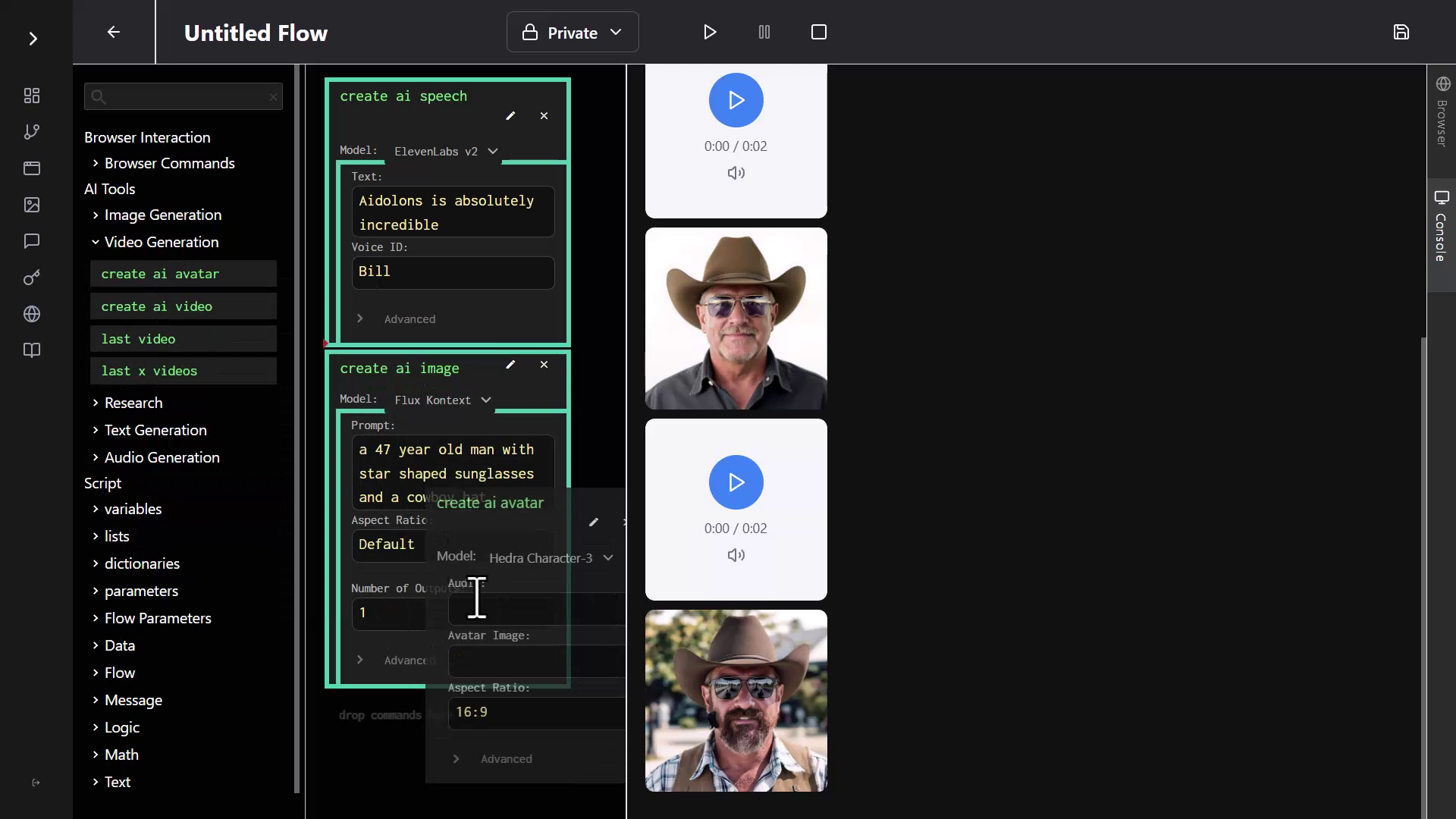
  1. I dragged the "Create AI Speech" block into my Flow
  2. Clicked the pencil icon to edit it
  3. Typed: "Aidolons is absolutely incredible"
  4. Selected "Bill" as the voice and hit play

Speech Generation Interface

Within seconds, Bill's voice came to life: "Aidolons is absolutely incredible." And I had to agree with him!

But I wanted to see Bill while he talked, so I dragged in the "Create AI Image" block and typed: "a 47 year old man with star-shaped sunglasses and a cowboy hat."

After three hilarious attempts (and some creative spelling of "star"), the AI never quite gave me those star-shaped sunglasses I wanted. But that's the beauty of it – experimenting is quick and fun when you're just dragging blocks around.

Creating Your First Avatar Video

This is where it gets really cool. I dragged in the "Create AI Avatar" block, which combines image and voice:

  1. Clicked the pencil to edit
  2. Selected our audio file from the asset chooser
  3. Picked one of the generated images
  4. Hit run

Avatar Generation Interface

The result? Bill came to life, moving his lips in perfect sync: "Aidolons is absolutely incredible." It was weird. It was amazing. I had to watch it twice.

Quick Win: In just 2 minutes of dragging blocks around, I'd created a talking avatar. No coding, no complex software – just drag, drop, and click. But here's where it gets even better...

Step 2: From Flow to Full App (The Mind-Blowing Part)

Here's where things get exciting. Flows are great for personal use, but what if you want to create a polished app that others can use? Enter App Scaffolding.

Building a Real App in 30 Seconds

Here's where App Scaffolding truly shines:

  1. I clicked over to the Apps menu
  2. Selected "Create App"
  3. Chose "From Scaffolding"
  4. Here's the key: I simply dragged in the same blocks I'd been using – "Create AI Speech" and "Create AI Avatar"

App Scaffolding Interface

Now, instead of writing hundreds of lines of code, I just filled in the app details:

  • Short description: "Avatar Creator"
  • Detailed description: "Create an avatar generation app. It should have the user first create an image of a character, then some audio using text-to-speech, and then use those to generate the avatar video."

Then I clicked "Save and Generate."

What happened next was pure magic. The AI started generating code – actual React code – line by line. Functions, components, the entire application structure materialized before my eyes. Imagine writing all of this manually. The amount of time saved is staggering.

Within seconds, it had created a beautiful three-step app interface.

Generated App Interface

Testing My New App (The Fantasy Warrior)

Time to test the app I'd just generated. The AI had created a clean multi-step interface:

Step 1: I typed "A fantasy warrior with glowing eyes" but changed it to be more specific: "realistic fantasy warrior with glowing yellow eyes and she has a sword."

The AI generated an incredible warrior image with those glowing yellow eyes.

Step 2: I clicked "Next" (the AI had even added navigation between steps!). For the speech, I typed: "I have traveled through mountains and deserts to find my destiny."

Step 3: The final step – "Animate Avatar." I clicked the button and waited.

"I have traveled through mountains and deserts to find my destiny," the warrior said, her lips moving perfectly in sync with the words.

I work with this stuff every day and it still blows my mind. The quality and realism of these AI-generated avatars is incredible.

Your Turn to Create

Let's recap what just happened. In about 4 minutes, using nothing but drag-and-drop:

  • I experimented with AI voice generation
  • Created multiple AI-generated images
  • Built my first talking avatar
  • Transformed those experiments into a polished, multi-step application
  • Generated a fantasy warrior that looks like she stepped out of a video game

And here's the kicker – you can embed these apps on WordPress sites with full monetization. These aren't just toys; they're potential products.

Think about what this means for you:

  • Create AI spokespersons for your products
  • Build interactive demos that wow clients
  • Generate training videos on demand
  • Launch your own AI apps (and monetize them!)

The best part? You already have everything you need. No coding bootcamp. No expensive courses. Just drag, drop, and ship.

Ready to Build Your Own AI Avatar App?

You've seen how easy it is. In less time than it takes to order lunch, you could have your first AI app up and running.

No coding bootcamps. No expensive developers. Just drag, drop, and launch.

Yes, I'm ready to create my first AI app »


P.S. With Aidolons' 14-day money-back guarantee, if you don't launch a live app within 14 days, you pay absolutely nothing. What are you waiting for?

From $0 to $250 in 24 Hours: How I Built My First AI SaaS (No Coding, No Kidding)

· 10 min read

In the video above, you'll see exactly how to build and monetize your own AI app in under 30 minutes – a process so simple, anyone can start earning from their ideas.

Sign Up For Aidolons Now

Picture this: You wake up to a notification. Someone just paid $47 for access to your AI tool. While you were sleeping.

Except you don't have an AI tool. You don't know how to code. And you definitely don't have $56,000 to hire developers.

You've been stuck watching from the sidelines as everyone and their cousin launches some "revolutionary" AI app that's really just a chatbot with a price tag. $97 here, $297 there – for tools that do one simple thing you could probably figure out yourself if you just knew how to package it.

The worst part? You know exactly what tool your market needs. You understand their workflow better than any Silicon Valley startup. But without technical skills, your ideas stay trapped in your head while others cash in on worse solutions.

Well, what if I told you that you don't need to know how to code? What if you could build, launch, and start selling your own AI app before lunch tomorrow?

That's exactly what we're diving into today.

The $56,000 Question Nobody Wants to Ask

Let's talk about the elephant in the room. Traditional app development is broken.

Quick Win: Right now, think of the most tedious part of your work that involves content creation. Not just "writing emails" – think bigger. Maybe it's creating training videos, producing podcast content, or researching market trends. That task could be your first $1,000+ AI app. Write it down – we'll come back to it.

Here's what usually happens when someone tries to build an AI SaaS:

  • Week 1-2: Finding a developer who "gets it" ($2,000 in consultations)
  • Week 3-6: Development starts, scope creep begins ($15,000 and counting)
  • Week 7-8: "Almost done" (translation: 4 more weeks)
  • Week 12: Launch! ...followed by bugs, payment integration issues, and vanishing developers

Total damage? $56,000 on average – and that's just for a basic app. Complex features? Six figures easy. And that's before you realize you need ongoing maintenance.

But here's the kicker – while you're burning through savings, someone with zero coding skills just launched their third AI app this month using Aidolons.

The 27-Minute Challenge: Building an AI Video Generator

In the video above, I took on a challenge: build a fully functional, monetizable AI video generator in less time than it takes to watch a sitcom. No pre-planning, no scripts, just the Aidolons platform and a simple idea.

Here's what happened:

Minute 0-5: Setting Up the Foundation

Starting from the Aidolons dashboard, just click "Create App." The interface that appears isn't some intimidating code editor – it's more like filling out a simple form.

The magic happens in two ways:

  • Scaffolding View: Where you describe what you want
  • Chat Mode: Where you literally talk to AI like a colleague

For this demo: "A video generator with the video controls in a left sidebar. The output appears to the right side."

That's it. No technical specifications. No wireframes. Just plain English.

Minute 5-10: Adding AI Superpowers

This is where it gets exciting. Aidolons gives you instant access to cutting-edge AI models – no API keys to manage, no separate accounts to juggle:

  • Veo 3 for Hollywood-quality videos with synchronized sound
  • Claude 4 and o3 for genius-level reasoning and analysis
  • Flux and Imagen for photorealistic image generation
  • ElevenLabs for voice cloning and multi-language dubbing
  • Autonomous agents that can browse the web and complete complex tasks

These aren't your basic ChatGPT wrappers. We're talking about AI that can:

  • Generate 5-minute films with dialogue, music, and sound effects
  • Create virtual beings that earn millions in sponsorships
  • Conduct 8-hour research sessions analyzing hundreds of sources
  • Transform single photos into explorable 3D worlds
  • Produce entire podcast series with multiple AI hosts

Drag "Create AI Video" into the app's capabilities, select Hailuo 2 (best bang for your buck), and hit generate.

The moment professional code started appearing automatically, everything clicked. This wasn't another no-code tool with training wheels. This was the real deal – access to the same AI models that power million-dollar productions.

Minute 10-15: Customization Magic

Here's where Aidolons really shines. To make it an anime video generator, just switch to Chat mode and type:

"Change the headline to say 'Anime Video Generator' and make it add 'in an anime style' to every prompt automatically."

The AI understood exactly what I wanted. No back-and-forth. No confusion. It just... worked.

Minute 15-27: Making It Profitable

This is the part that makes jaws drop. See that "Publish" toggle? One click, and your app becomes a money-making machine.

Using the CommerceBridge™ system:

  1. Download the WordPress plugin
  2. Connect it with an API key
  3. Set up two payment options:
    • Blue Credits: Monthly subscriptions (recurring revenue!)
    • Green Credits: One-time purchases

The system handles everything – payment processing, credit allocation, user management. You just decide the pricing.

The Money Part (Because Let's Be Real, That's Why You're Here)

Traditional SaaS math is brutal:

  • Development: $56,000
  • Monthly hosting: $500
  • Maintenance: $2,000/month
  • Break-even: Year 2 (if you're lucky)

Aidolons math is different:

  • Development: $0 (you build it yourself)
  • Monthly cost: $9-59 (depending on usage)
  • Maintenance: Automatic
  • Break-even: Your first customer

But here's what really matters – the revenue potential.

Real Apps, Real Money

Here's what's actually possible:

  • AI Documentary Producer: $4,700 per 10-minute film with narration, B-roll, and soundtrack
  • Virtual Event Host Service: $847 per multilingual avatar presentation
  • 3D Scene Generator: $297 per interactive virtual tour from a single photo
  • Autonomous Research Bot: $1,247 per comprehensive market analysis
  • AI Music Production Suite: $167 per custom track with vocals
  • Virtual Influencer Management: $5,000+/month for a complete AI personality

These are the kinds of apps you could build – each solving a specific problem for a specific audience.

Your WordPress Site = Your SaaS Platform

Here's something the video demonstrates beautifully – you don't need a separate platform. Your existing WordPress site becomes your SaaS hub.

The WordPress integration is genuinely plug-and-play:

  1. Install the Aidolons plugin (2 minutes)
  2. Add your API key (30 seconds)
  3. Import your published apps (1 click each)
  4. Start accepting payments (immediately)

Your customers get:

  • Professional login with Google authentication
  • Clean dashboard to manage credits
  • Seamless access to your AI apps
  • Smooth payment experience

You get:

  • Automated credit distribution
  • Payment processing (via WooCommerce)
  • User management
  • Zero technical headaches

The "But What Should I Build?" Question

This is where most people get stuck. They overthink it. Here's the solution: solve your own problem first.

What AI tool do you wish existed? What would make your work easier? Start there.

Need inspiration? Here are apps that match what's actually possible in 2025:

For Media Producers:

  • AI Documentary Studio: Generate complete documentaries with AI-narrated voiceovers, custom B-roll footage, and synchronized soundtracks – all from a script ($4,700 per project)
  • Virtual Spokesperson Platform: Create photorealistic avatar videos in 175+ languages with your brand's exact voice and personality ($297/month subscriptions)
  • Podcast Empire Builder: Generate entire podcast series with multiple AI hosts discussing your topics, complete with intro music and dynamic conversations ($197 per episode)

For Creative Agencies:

  • 3D World Generator: Transform single photos into explorable virtual environments for real estate, events, or gaming ($847 per scene)
  • AI Film Production Suite: Generate cinema-quality videos with synchronized dialogue, sound effects, and music – no crew needed ($2,400 per video)
  • Virtual Influencer Factory: Create and manage AI influencers that post content, engage followers, and generate sponsorship revenue ($5,000+ monthly retainers)

For Business Services:

  • Autonomous Research Agency: Deploy AI agents that conduct 8-hour research sessions, analyze 100+ sources, and deliver investment-grade reports ($1,247 per report)
  • AI Sales Force: Virtual sales reps that browse websites, fill forms, book meetings, and follow up with prospects 24/7 ($497/month per agent)
  • Scientific Discovery Engine: AI that analyzes research papers, proposes hypotheses, and designs experiments for biotech/pharma ($10K+ per project)

For Entertainment:

  • AI Music Label: Generate complete albums with original songs, vocals, and production in any genre ($167 per track, $1,500 per album)
  • Interactive Story Worlds: Create choose-your-own-adventure experiences with AI-generated video scenes that adapt to user choices ($97/month subscriptions)
  • Virtual Concert Producer: Generate live performance videos of AI bands with original music and synchronized visuals ($2,100 per show)

The beauty? Each of these can be built in under an hour. Seriously.

The Technical Stuff (That Isn't Actually Technical)

Let's address the elephant in the room – "But I'm not technical!"

You don't need to be. The whole point is that technical skills are no longer the barrier they used to be.

Here's what "technical" means with Aidolons:

  • Typing what you want in plain English
  • Dragging boxes from one side to another
  • Clicking publish when you're happy

That's it. The platform handles:

  • All the coding (FlowBuilder™ writes it for you)
  • API integrations (pre-connected)
  • Payment processing (built-in)
  • Hosting and scaling (automatic)
  • Security and updates (managed)

If you can write an email, you can build an AI app.

The Part Where I Get Real With You

Look, I know what you're thinking. "This sounds too good to be true."

That's a fair reaction. But here's the thing - we're in a unique moment. AI is powerful but intimidating to most people. They want the benefits but don't want to deal with prompts, credits, or multiple subscriptions.

That's your opportunity. Package AI in a way that solves one specific problem. Make it simple. Make it focused. Make it theirs.

Your Next 27 Minutes

Here's the challenge: Block out 30 minutes today and build something.

Don't overthink it. Pick one thing that annoys you about your current workflow. Maybe it's writing product descriptions. Maybe it's creating social media posts. Maybe it's something unique to your industry.

Build the solution you wish existed.

The video above shows every single step. Follow along if you want, or freestyle it. The point is to start.

Because here's the truth: The best time to build an AI app was yesterday. The second best time is right now.

The Bottom Line

Every day, someone is paying for an AI solution that doesn't quite fit their needs. They're compromising, overpaying, or cobbling together multiple tools.

You could be the person who gives them exactly what they want.

With Aidolons, you're not just building an app. You're building:

  • A revenue stream that works while you sleep
  • A solution to your own workflow problems
  • An asset that gets more valuable over time
  • A business with near-zero overhead

The question isn't whether you can do this. The platform proves you can. The question is: What will you build first?

Ready to join the AI SaaS revolution? Sign up for Aidolons and build your first app today. (14-day refund guarantee)


P.S. That anime raccoon wizard in the video? Creating that custom feature took less time than writing this sentence. Just saying.

How to Automate Your Viral Video Factory in 3 Simple Steps

· 4 min read

(Watch the video above to see this workflow in action!)

Sign Up For Aidolons Now

Ever see a video rack up millions of views and wonder, "Can I create that kind of content without losing hours of my life?" For entrepreneurs and online marketers, producing viral content often feels impossible due to the endless cycle of research, scripting, filming, and editing.

But what if you had a streamlined, automated system—a 'viral video factory'—that handled it all for you?

Today, you'll learn exactly how to build this automated video workflow using Aidolons in just three simple steps. It’s time to transform from an observer into a creator.

A Quick Mindset Shift: AI is Your Tool, Not Your Coworker

Before jumping in, let's clarify something important. You've probably heard the advice: "Treat AI like a colleague." We’ve found that approach usually disappoints. AI is powerful but incredibly literal—it thrives on clear, specific instructions.

  • ❌ Myth: Treat AI as a creative partner.
  • ✅ Reality: Treat AI as a precise, powerful tool.

Think of AI as a wrench: it does its best work when you match it exactly to the task. Specificity unlocks its true potential.

Quick Tip: Don’t say, "Write an email." Instead, ask, "Write a friendly, 100-word follow-up email to Jane Doe referencing our Tuesday call, asking about the proposal, and inviting her to schedule a meeting."

Your 3-Step Viral Video Automation Workflow

With the right mindset established, let’s automate your viral video production from concept to upload.

Step 1: Automate Your Research

Don't spend hours manually analyzing TikTok or YouTube trends. Use an AI agent, like Aidolons’ Deep Research Tool, to generate precise trend reports for you.

Our exact research prompt:

"Use the Deep Research Tool to find what videos created with Veo 3 are going viral. Explain what Veo 3 is, why it’s special, and highlight specific topics and techniques creators use successfully."

This targeted prompt gives the AI clear instructions, resulting in a detailed trend analysis that fuels your content strategy.

Step 2: Generate and Refine Video Ideas

With the research in hand, have your AI generate video ideas aligned with current trends. Use a direct, specific prompt:

"Based on this research, give me 20 short, visually engaging ideas suitable for 8-second Veo 3 videos. Avoid complex scenes or text-heavy concepts."

Remember, your first results might need refining—iteration is key. Simply provide feedback like "simplify these ideas" or "make them visually simpler," and you’ll quickly get usable concepts, such as:

  • Corgi Splash: Life-jacketed corgi jumps into a kiddie pool, wagging tail and splashing.
  • Hoodie Snap: Person snaps fingers, and a hoodie instantly pops onto their head.

These straightforward ideas are ideal for AI-generated video content.

Step 3: Generate and Auto-Upload Your Video

(Want to see if it could save you hours each week? You can get started here)

Finally, generate your selected video concept with Aidolons and automate the upload process:

Here's the simple Aidolons flow we created:

  1. Generate AI Video: Select the affordable yet powerful Hailuo 2 model and use your refined prompt (e.g., corgi pool scene).
  2. Navigate: Open your preferred social platform.
  3. Click "Create Post": Automatically click the button to start a new post.
  4. Upload Video: Aidolons automatically selects the recently generated video file.
  5. Publish: Click to publish your automated post.

And that's it—your entire content creation and upload process, simplified and automated.

Ready to Build Your Own Automated Content Machine?

By clearly instructing your AI tool and using automation strategically, you can move from chasing trends to setting them.

Imagine waking up each morning to freshly created, viral-ready videos already uploaded and engaging your audience—this is the power of your automated viral video workflow.

Ready to try it yourself?

Yes, I’m ready to build my first flow »

Got questions or ideas for other workflows? Comment below. Happy automating!