
2 posts tagged with "automation"

View All Tags

How to Automate Your Viral Video Factory in 3 Simple Steps

· 4 min read

(Watch the video above to see this workflow in action!)

Sign Up For Aidolons Now

Ever see a video rack up millions of views and wonder, "Can I create that kind of content without losing hours of my life?" For entrepreneurs and online marketers, producing viral content often feels impossible due to the endless cycle of research, scripting, filming, and editing.

But what if you had a streamlined, automated system—a 'viral video factory'—that handled it all for you?

Today, you'll learn exactly how to build this automated video workflow using Aidolons in just three simple steps. It’s time to transform from an observer into a creator.

A Quick Mindset Shift: AI is Your Tool, Not Your Coworker

Before jumping in, let's clarify something important. You've probably heard the advice: "Treat AI like a colleague." We’ve found that approach usually disappoints. AI is powerful but incredibly literal—it thrives on clear, specific instructions.

  • ❌ Myth: Treat AI as a creative partner.
  • ✅ Reality: Treat AI as a precise, powerful tool.

Think of AI as a wrench: it does its best work when you match it exactly to the task. Specificity unlocks its true potential.

Quick Tip: Don’t say, "Write an email." Instead, ask, "Write a friendly, 100-word follow-up email to Jane Doe referencing our Tuesday call, asking about the proposal, and inviting her to schedule a meeting."

Your 3-Step Viral Video Automation Workflow

With the right mindset established, let’s automate your viral video production from concept to upload.

Step 1: Automate Your Research

Don't spend hours manually analyzing TikTok or YouTube trends. Use an AI agent, like Aidolons’ Deep Research Tool, to generate precise trend reports for you.

Our exact research prompt:

"Use the Deep Research Tool to find what videos created with Veo 3 are going viral. Explain what Veo 3 is, why it’s special, and highlight specific topics and techniques creators use successfully."

This targeted prompt gives the AI clear instructions, resulting in a detailed trend analysis that fuels your content strategy.

Step 2: Generate and Refine Video Ideas

With the research in hand, have your AI generate video ideas aligned with current trends. Use a direct, specific prompt:

"Based on this research, give me 20 short, visually engaging ideas suitable for 8-second Veo 3 videos. Avoid complex scenes or text-heavy concepts."

Remember, your first results might need refining—iteration is key. Simply provide feedback like "simplify these ideas" or "make them visually simpler," and you’ll quickly get usable concepts, such as:

  • Corgi Splash: Life-jacketed corgi jumps into a kiddie pool, wagging tail and splashing.
  • Hoodie Snap: Person snaps fingers, and a hoodie instantly pops onto their head.

These straightforward ideas are ideal for AI-generated video content.

Step 3: Generate and Auto-Upload Your Video

(Want to see if it could save you hours each week? You can get started here)

Finally, generate your selected video concept with Aidolons and automate the upload process:

Here's the simple Aidolons flow we created:

  1. Generate AI Video: Select the affordable yet powerful Hailuo 2 model and use your refined prompt (e.g., corgi pool scene).
  2. Navigate: Open your preferred social platform.
  3. Click "Create Post": Automatically click the button to start a new post.
  4. Upload Video: Aidolons automatically selects the recently generated video file.
  5. Publish: Click to publish your automated post.

And that's it—your entire content creation and upload process, simplified and automated.

Ready to Build Your Own Automated Content Machine?

By clearly instructing your AI tool and using automation strategically, you can move from chasing trends to setting them.

Imagine waking up each morning to freshly created, viral-ready videos already uploaded and engaging your audience—this is the power of your automated viral video workflow.

Ready to try it yourself?

Yes, I’m ready to build my first flow »

Got questions or ideas for other workflows? Comment below. Happy automating!
Introducing Aidolons.com: Reliable AI-Powered Web Automation for Real-World Work

· 5 min read

Video demo above: watch how easy it is to automate in aidolons.com.

Sign Up For Aidolons Now


Ever Asked, “Why Can’t AI Just Do This for Me—Correctly?”

You stare at the screen, mug of coffee cooling fast, while an “intelligent” chatbot tries (and fails) to do something a human could have done easily. Sound familiar? You’re not alone. Most large language models boast benchmark scores, yet in the wild they still hallucinate, make things up, and just get things wrong.

Quick reality check: for business tasks, almost-right equals plain wrong. If an invoice goes to the wrong customer or a scraper misses half the data set, you’re left cleaning up the mess.

That’s exactly why we built Aidolons.com—and why we’re thrilled to open the doors today.

(Want to see if it could save you hours each week? You can get started here)


What Is Aidolons.com, in One Sentence?

A platform that lets you build reliable, AI-powered web automations—from quick one-off chores to mission-critical, multi-step workflows—without writing code or crossing your fingers.


The Two Ways You Can Automate

1. Talk to an AI Agent (Great for Small, Ad-Hoc Tasks)

  • Open a chat window.
  • Give crystal-clear, step-by-step instructions.
  • Watch the agent navigate, click, type, and finish the job.

Quick Win: Treat the AI like it’s brand-new to the internet. Spell out the exact URL and the precise button text (“click Add to Cart, not just ‘add the item’”). You’ll boost success rates instantly—even outside Aidolons.com.

2. Build Flows Visually — No-Code, Step-by-Step

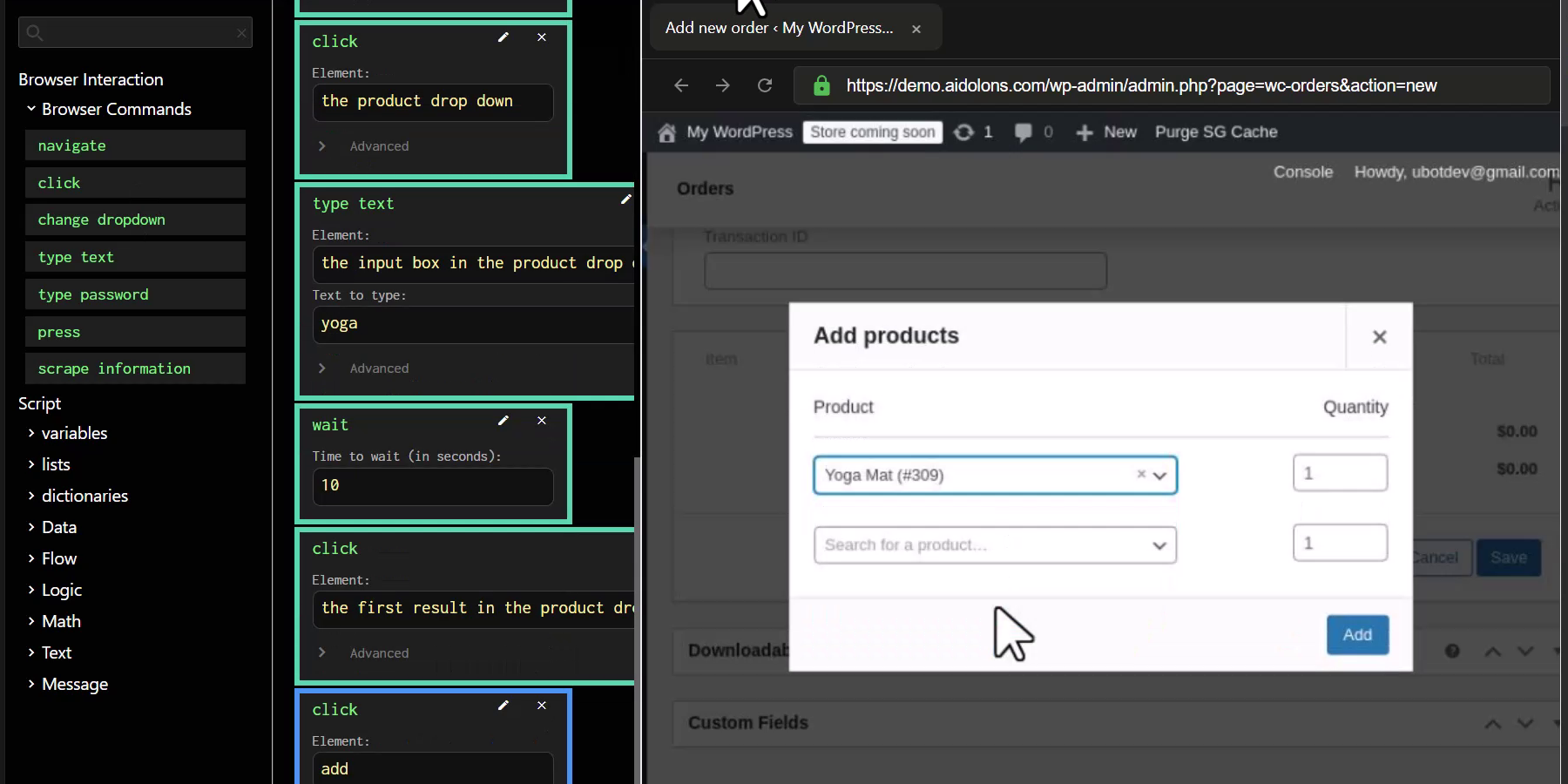
Aidolons.com lets you drag actions from the “Browser Commands” palette (navigate, click, type, wait, etc.) into a vertical stack of blocks. Each block is written in plain English and runs in order—so tomorrow’s run is identical to today’s.

  • Pick an action on the left.
  • Drop & fill the block (e.g., click → “Add products”).
  • Watch the remote browser on the right to confirm it worked.
  • Repeat until the whole task is captured.

No nodes to wire together, no code to debug—just a clean, top-to-bottom list you can read like a recipe.

Aidolons Flow Editor showing drag-and-drop blocks automating an order creation screen

Why Aren't We All Using Agents Already?

We've heard people go on and on about how incredible agents are. So why aren't we all using them already?

Generic agents are probabilistic—they “think” they know which element is a dropdown, but sometimes they don’t. In reality, they're subject to all the same failings as any AI.

That’s fine for a party trick; not fine for payroll.

Aidolons.com layers deterministic logic on top of AI:

  1. Natural-language selectors (“the blue Save button”) become locked-in element IDs.
  2. Each step runs only after the previous one passes.
  3. You can loop, branch, or manipulate data, but every action remains explicit.

Result? If you're careful, you really can hit 100 % success on tasks.

“I stopped double-checking every scraped row. Aidolons.com hasn’t missed once in two months.” — Mark T., boutique agency owner


Five Surprising Jobs You Can Hand Off Today

TaskTime Saved / RunFlow or Agent?
Issue invoices from WooCommerce orders2–3 minAgent
Create new customer orders with multiple products10 minFlow
Bulk-edit Shopify product prices15 minFlow
Pull SEO metrics from three tools into one sheet20 minFlow
Copy Facebook leads into your CRM5 minAgent

(Imagine sipping coffee instead of babysitting those clicks.)


How We Kept It Simple for Non-Tech Folks

  • Plain-English commands. If you can write “click the green Publish button,” you can build a flow.
  • Instant test browser. See each step run in real time—no “deploy and pray.”
  • Natural-language element picking. Forget CSS selectors; just describe what you see.
  • No-code, but devs aren’t boxed out. Prefer Python? Use the SDK and still tap our AI element-finding magic. (Coming Soon)

A Peek Under the Hood (For the Curious)

  • Built-in SOTA models fine-tuned for automating tasks
  • Secure cloud browsers—nothing installs on your machine
  • Starts at $19/month; cancel any time

Ready to Reclaim Your Time?

Imagine opening your laptop tomorrow and finding:

✔️ Orders already processed
✔️ Reports neatly stored in Google Drive
✔️ 32 new leads sitting in your CRM—without a single copy-paste

That’s what early users are seeing, and we’d love for you to join them.

Yes, I’m ready to build my first flow »


Share the Love ❤️

Know a freelancer or store owner drowning in busywork? Forward this post or hit the share buttons—because no one deserves to spend another afternoon wrestling dropdowns.

Thanks for celebrating launch day with us. Can’t wait to see what you automate!