How I Created an AI Avatar App with No Code
(Watch the video above to see me build an AI avatar app from scratch in real-time!)
Ever stare at your computer screen with a brilliant idea burning in your mind, only to feel blocked because you don't know how to code it into existence?
You're not alone. That feeling of being stuck between vision and execution haunts thousands of entrepreneurs, creators, and innovators every day.
What if I told you that your destiny isn't to become a coder, but to become a creator – empowered by the right tools?
In the next 5 minutes, I'll show you exactly how I built a fully functional AI avatar application using Aidolons' drag-and-drop interface. No coding. No complicated setup. Just dragging blocks onto a canvas and clicking buttons.
The Creator's Quest: More Than Just Automation
Let's be honest – you didn't start your business journey to become a programmer. You started it to solve problems, create value, and build something meaningful. Yet somehow, the tech world keeps telling you that you need to master Python, JavaScript, or whatever the latest framework is just to bring your ideas to life.
That's exhausting. And frankly, it's holding you back.
The good news? Technology has finally caught up to your ambitions. Today, you're about to discover that your power lies not in coding, but in dragging and dropping AI-powered blocks that do the heavy lifting for you.
Step 1: Playing with Flows (The Fun Part)
Every epic creation starts with experimentation. Let me show you how to use "Flows" – Aidolons' visual automation builder where you drag blocks onto a canvas.
Creating Bill the Cowboy
I started by trying to create an AI-generated cowboy named Bill. Here's what happened:
- I dragged the "Create AI Speech" block into my Flow
- Clicked the pencil icon to edit it
- Typed: "Aidolons is absolutely incredible"
- Selected "Bill" as the voice and hit play

Within seconds, Bill's voice came to life: "Aidolons is absolutely incredible." And I had to agree with him!
But I wanted to see Bill while he talked, so I dragged in the "Create AI Image" block and typed: "a 47 year old man with star-shaped sunglasses and a cowboy hat."
After three hilarious attempts (and some creative spelling of "star"), the AI never quite gave me those star-shaped sunglasses I wanted. But that's the beauty of it – experimenting is quick and fun when you're just dragging blocks around.
Creating Your First Avatar Video
This is where it gets really cool. I dragged in the "Create AI Avatar" block, which combines image and voice:
- Clicked the pencil to edit
- Selected our audio file from the asset chooser
- Picked one of the generated images
- Hit run
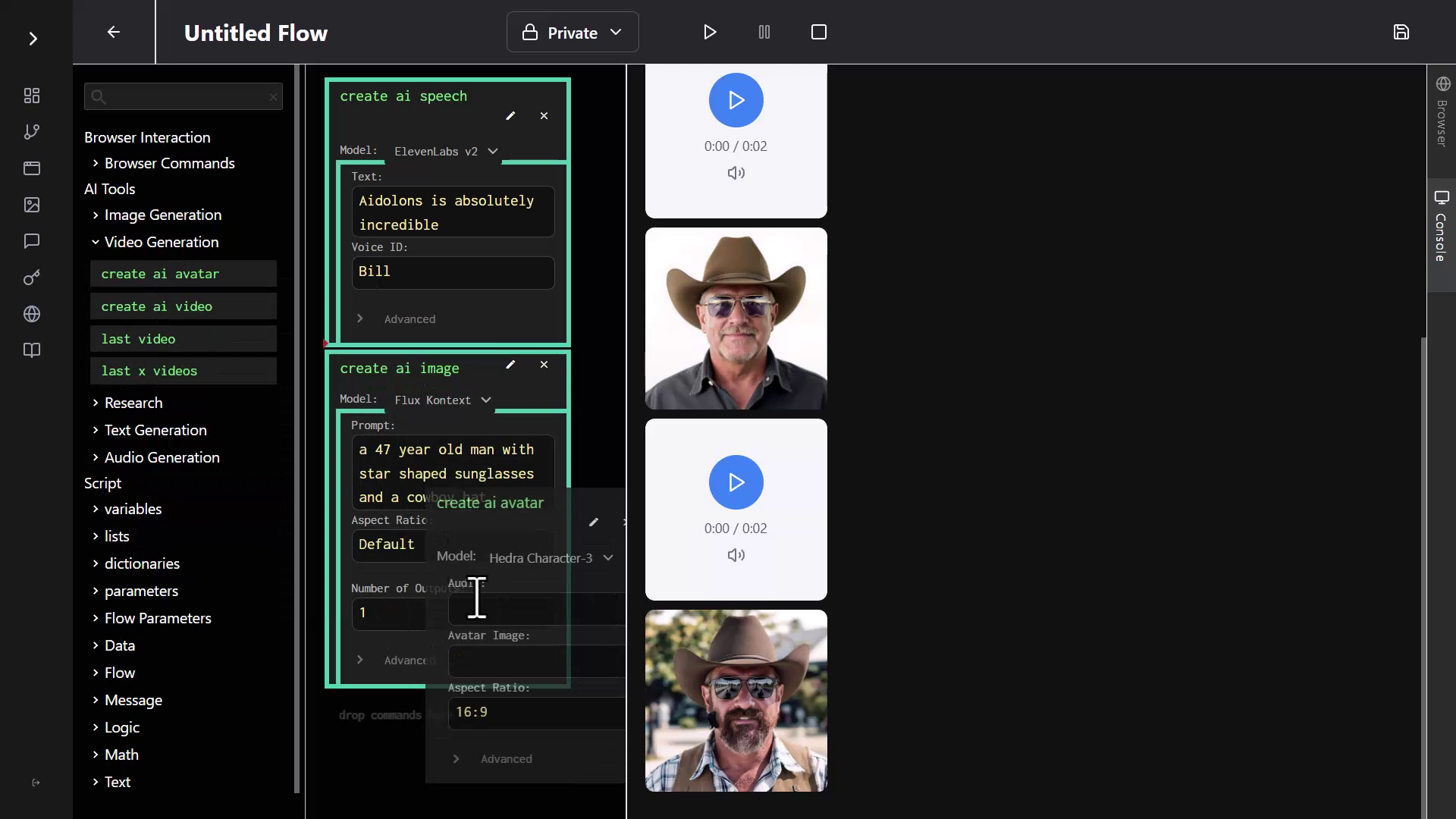
The result? Bill came to life, moving his lips in perfect sync: "Aidolons is absolutely incredible." It was weird. It was amazing. I had to watch it twice.
Quick Win: In just 2 minutes of dragging blocks around, I'd created a talking avatar. No coding, no complex software – just drag, drop, and click. But here's where it gets even better...
Step 2: From Flow to Full App (The Mind-Blowing Part)
Here's where things get exciting. Flows are great for personal use, but what if you want to create a polished app that others can use? Enter App Scaffolding.
Building a Real App in 30 Seconds
Here's where App Scaffolding truly shines:
- I clicked over to the Apps menu
- Selected "Create App"
- Chose "From Scaffolding"
- Here's the key: I simply dragged in the same blocks I'd been using – "Create AI Speech" and "Create AI Avatar"
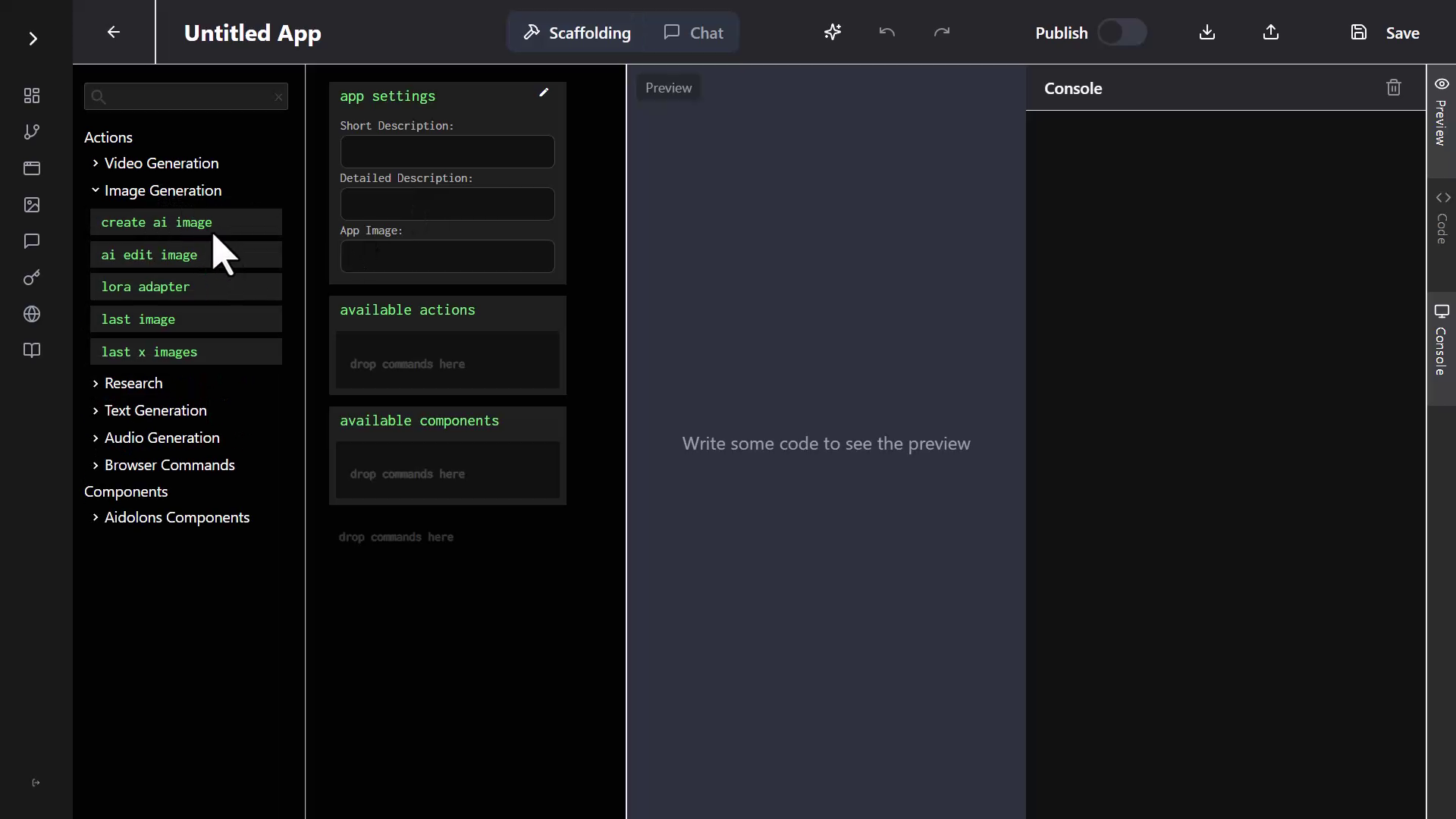
Now, instead of writing hundreds of lines of code, I just filled in the app details:
- Short description: "Avatar Creator"
- Detailed description: "Create an avatar generation app. It should have the user first create an image of a character, then some audio using text-to-speech, and then use those to generate the avatar video."
Then I clicked "Save and Generate."
What happened next was pure magic. The AI started generating code – actual React code – line by line. Functions, components, the entire application structure materialized before my eyes. Imagine writing all of this manually. The amount of time saved is staggering.
Within seconds, it had created a beautiful three-step app interface.

Testing My New App (The Fantasy Warrior)
Time to test the app I'd just generated. The AI had created a clean multi-step interface:
Step 1: I typed "A fantasy warrior with glowing eyes" but changed it to be more specific: "realistic fantasy warrior with glowing yellow eyes and she has a sword."
The AI generated an incredible warrior image with those glowing yellow eyes.
Step 2: I clicked "Next" (the AI had even added navigation between steps!). For the speech, I typed: "I have traveled through mountains and deserts to find my destiny."
Step 3: The final step – "Animate Avatar." I clicked the button and waited.
"I have traveled through mountains and deserts to find my destiny," the warrior said, her lips moving perfectly in sync with the words.
I work with this stuff every day and it still blows my mind. The quality and realism of these AI-generated avatars is incredible.
Your Turn to Create
Let's recap what just happened. In about 4 minutes, using nothing but drag-and-drop:
- I experimented with AI voice generation
- Created multiple AI-generated images
- Built my first talking avatar
- Transformed those experiments into a polished, multi-step application
- Generated a fantasy warrior that looks like she stepped out of a video game
And here's the kicker – you can embed these apps on WordPress sites with full monetization. These aren't just toys; they're potential products.
Think about what this means for you:
- Create AI spokespersons for your products
- Build interactive demos that wow clients
- Generate training videos on demand
- Launch your own AI apps (and monetize them!)
The best part? You already have everything you need. No coding bootcamp. No expensive courses. Just drag, drop, and ship.
Ready to Build Your Own AI Avatar App?
You've seen how easy it is. In less time than it takes to order lunch, you could have your first AI app up and running.
No coding bootcamps. No expensive developers. Just drag, drop, and launch.
Yes, I'm ready to create my first AI app »
P.S. With Aidolons' 14-day money-back guarantee, if you don't launch a live app within 14 days, you pay absolutely nothing. What are you waiting for?